
Content Vault is a Shopify app that lets you sell, protect, and manage digital content using subscriptions, memberships, and controlled file access — all directly inside your Shopify store.
Instead of delivering files as one-time downloads, Content Vault gives you ongoing control over who can access your content, how long they have access, and how that access is delivered.
It’s designed for creators, educators, and businesses selling digital content such as courses, templates, stock assets, gated libraries, or memberships.
How Content Vault Works (High Level)
At a high level, Content Vault connects three core pieces:
- Products – What customers purchase on your store
- Subscriptions – How customers are billed and granted access
- Files – The digital content customers can download or access
Once connected, Content Vault automatically handles:
- Billing and renewals
- Access control
- Download limits
- Delivery timing
- Customer access after cancellation (if enabled)
Subscription Types in Content Vault
Content Vault supports multiple subscription models, each designed for a different type of digital business.
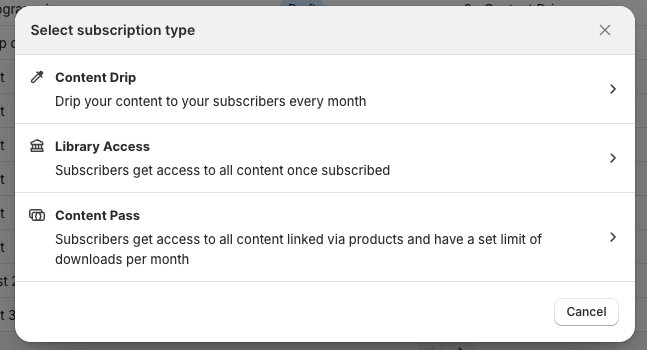
Content Drip
Deliver content over time on a schedule you control.
- Release files monthly or every X days
- Optional immediate first delivery
- Billing and delivery schedules are configured separately
- Ideal for courses, lessons, and ongoing content drops
👉 Example: A monthly course that unlocks new lessons each month.
Library Access
Give subscribers access to a gated library of files.
- Files can be available only while active or retained after cancellation
- Access rules are configurable per tier
- Ideal for memberships and resource libraries
👉 Example: A premium members-only library of PDFs, videos, or guides.
Content Pass
Limit how much content subscribers can download per billing cycle.
- Set a download allowance (e.g. 10 files per month)
- Allowance automatically resets on renewal
- Products or files can be linked per tier
- Ideal for large content libraries where usage needs limits
👉 Example: A stock photo or template library with monthly download caps.
Tiers and Pricing Plans
Each subscription can include multiple tiers (plans).
Tiers allow you to:
- Offer different prices and billing frequencies
- Control access rules per tier
- Assign different files or products per tier
- Avoid duplicating products in Shopify
Customers select their tier on the product page before purchasing.
File Access & Delivery
Content Vault gives you granular control over how files are delivered:
- Show download links on:
- Thank You page
- Order Status page
- Customer account
- Send automated download emails
- Limit downloads per file or per billing cycle
- Track download activity per customer
- Control access after cancellation or pause
All access rules are enforced automatically.
Managing Customers
Once customers subscribe, you can manage everything from the Customers page:
- View active, paused, and cancelled subscriptions
- See billing history and upcoming renewals
- Pause, cancel, or reactivate subscriptions
- Track file download activity
- View sent emails and payment status
This gives you a full picture of each subscriber in one place.
Why Use Content Vault?
Content Vault is built to handle real subscription workflows, not just file delivery.
It’s ideal if you want to:
- Sell recurring digital content
- Control access beyond one-time downloads
- Offer flexible pricing tiers
- Limit or schedule content delivery
- Keep everything inside Shopify
Next Steps
Now that you understand how Content Vault works, the next step is to set up your first subscription.
In the setup guide, you’ll learn how to:
- Create a subscription in Content Vault
- Choose the right subscription type (Drip, Library Access, or Content Pass)
- Link a Shopify product to start selling
- Configure tiers, pricing, and access rules
- Connect your files and activate the subscription
👉 Next: How to Set Up Content Vault
If you’re not sure which subscription type or configuration is best for your use case, feel free to reach out via live chat — we’re happy to help you get this dialed in.