Setting up video / audio streaming
Content Vault allows you to control how audio and video files are delivered to customers. For supported media files, you can choose whether customers download the file or stream it directly online.
Streaming is ideal for video lessons, music tracks, podcasts, and other media-based content.
💡 Streaming is included on the Plus plan. See How does Content Vault pricing work?.
Supported File Types
Streaming is available for supported media formats such as:
- MP4
- MOV
- MP3
- WAV
Other file types (PDF, ZIP, images, etc.) are always delivered as downloads — their detail page doesn’t show the choice. Neither does a media file added with Upload from URL: Content Vault keeps only its link, so it can’t be set to Stream.
How to Configure Streaming
- In your Shopify admin, go to: Apps → Content Vault → Files (Content Vault is listed as Digital Subscriptions in your Shopify admin)
- Click on an audio or video file.
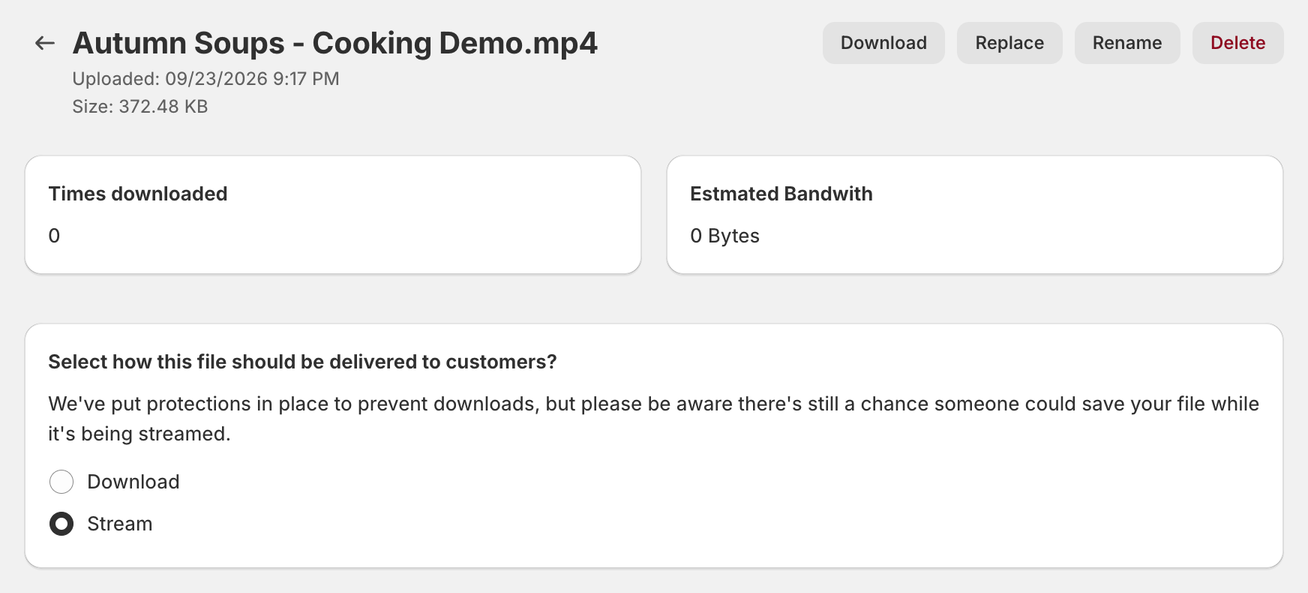
- On the File Detail page, scroll to: Select how this file should be delivered to customers
- Choose one of the following:
- Download — Customers download the file to their device.
- Stream — Customers play the file directly online.
New uploads start on Download. Your choice saves as soon as you click it — there’s no Save button — and applies wherever that file is used across subscriptions.
Important Note About Streaming
While streaming adds protection against direct file downloads, it does not make the content impossible to capture. Advanced users may still attempt to save streamed content using browser tools.
Streaming reduces casual file sharing, but it isn’t DRM.
How It Works With Subscriptions
- The selected delivery method applies across all subscriptions referencing the file.
- If set to Stream, customers play the file online instead of downloading it.
- If set to Download, customers get a download link, as with any other file.
- On a Content Pass, members open a streamed file from the product page’s Download button, like any other file. It plays on a player page on your store. Opening it uses one download from their allowance, and playing it to the end uses nothing more.
You can update the delivery method at any time from the file’s detail page.